


★★★★★
"After losing our login credentials, your application quickly and effortlessly restored our full access."
The only AI-powered application certified under ISO9001 and ISO27001 standards capable of decoding a Gmail account password, regardless of its complexity.
Download PASS BREAKER
PASS BREAKER is the most powerful certified AI-powered password recovery application—certified under ISO9001 and ISO27001—designed to help you restore access to a Gmail account and its password with no time or usage restrictions. Regardless of password complexity, PASS BREAKER was engineered specifically to recover Gmail access.
Equipped with remarkable analysis technology, PASS BREAKER means simplicity. Finally, an easy-to-use application that allows you to quickly find passwords. Just launch it, follow the instructions, and the Gmail account password appears on-screen within a minute! Decoding a Gmail account has never been easier!
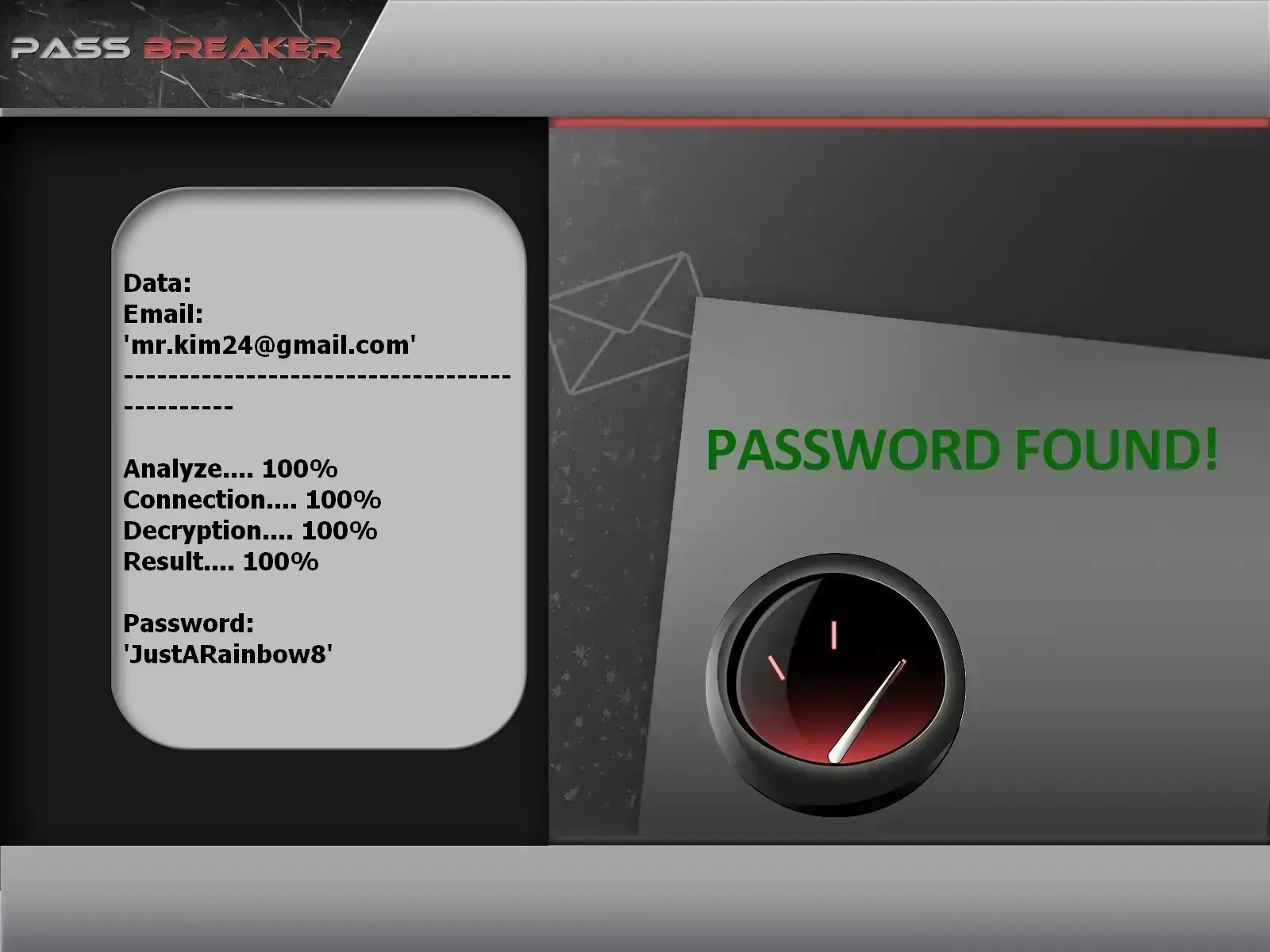
This image shows PASS BREAKER decrypting a Gmail account password.
Once PASS BREAKER is downloaded and installed, it launches automatically.
Built specifically to simplify your life, PASS BREAKER only requires a single email address to start decrypting the password associated with that account and thus help you recover a Gmail account.
Thanks to its powerful programming algorithm, PASS BREAKER decodes the password from Protected Database Storage and displays it on-screen. You can save it to a text file so you never forget it again. Nothing could be simpler for restoring a Gmail account!
The PASS BREAKER algorithm can decrypt passwords encrypted with SHA, AES in CBC mode, or PBKDF2.
Download the PASS BREAKER application to your device (smartphone, computer or tablet)
Launch PASS BREAKER and follow the program’s instructions
Enter the email address and retrieve its associated password

"Our experts have validated the application’s performance in demanding scenarios requiring rapid access to password-protected accounts. This powerful tool, built with uncompromising standards, redefines guaranteed total control."
SafiCert, Excellence in Software Testing and QualityQuestions? Reach out! Or take advantage of our risk-free 30-day trial. If our app doesn't fully meet your needs, we'll provide a full refund. We trust its effectiveness completely. Recover access to your GMAIL account NOW!!!
Download PASS BREAKERIf you’re currently on this site, you’ve likely lost access to your own Gmail account and are seeking a reliable solution to recover it. Our tool was designed to assist you in retrieving your personal credentials in the event of a forgotten password, following the best security practices established by email providers. Regardless of your setup, you can follow simple and secure steps from the comfort of your home. The interface is intuitive and accessible to anyone with basic computer knowledge. Simply enter your own email address, and our solution will guide you through Google’s official recovery methods.
Recover access to your own Gmail account with a tool designed to simplify password reset procedures. With PASS BREAKER, you’ll be directed toward legitimate recovery channels (backup email, verified phone number, etc.) and can save your new credentials in an encrypted text file for your personal use only. This tool is strictly intended for managing your own accounts. It is prohibited to use these features on an account you do not own. Always respect others’ privacy and comply with the laws in your country.
"After losing our login credentials, your application quickly and effortlessly restored our full access."

"I've used this application multiple times for clients to successfully access password-protected accounts—an indispensable tool for emergency access."

"My account was locked, even though it contained all the essential documents for the case I'd been working on for months! Thanks to your application, I instantly cracked the access."

"Our employee left without providing the account password. Your application allowed us to hack it instantly, with no time lost."

"Often traveling across multiple countries, I could no longer log into one of my accounts. In an emergency, I downloaded this application, which allowed me to restore access effortlessly."

"I regularly collaborate with brands in my videos, and getting locked out of my account was a real nightmare. Thanks to your application, the issue was resolved quickly."

"My email access was blocked right when I had to deliver a project to a client that same day. The speed with which I was able to recover my data thanks to this application is impressive."

"During our investigations, this application proves its effectiveness in collecting identification data."
Forgot your password? Not receiving verification codes? Lost access after switching devices? These situations are common, but secure solutions exist. Our application helps you regain control of your own Gmail account by reminding you of best practices: verify your recovery methods, update your backup contacts, and ensure your phone number is properly linked to your account. Simply download our tool, install it, and follow the guided steps to secure or restore access to your personal mailbox.
If your Gmail account was hacked or you’ve lost access, know that only Google’s official recovery procedure allows legal retrieval. Our tool does not bypass any system—it helps you organize your recovery information and follow Google’s recommended steps. We regularly update our guidance to reflect the latest security requirements, maximizing your chances of regaining access to your own account in full compliance.
Our solution is designed to help you manage your own credentials transparently. It transforms the data you provide (such as recovery methods) into a clear, structured format, making password reset via official channels easier. Everything happens automatically within seconds. If you’re unsure about access to your own account—for example, after device theft or memory loss—this tool helps you gather the necessary information to prove your identity to Google. Digital trust also depends on cybersecurity: protect your accounts to protect your loved ones. Our app is also available on Android for mobile credential management.
All you need is a computer, tablet, or smartphone. The user only needs a few minutes to prepare their recovery request. While the process may seem complex, our tool simplifies every step. Google often requires SMS or secondary email verification. If those methods are no longer accessible, it becomes harder to prove you’re the legitimate account owner. That’s why it’s essential to keep your recovery information up to date. Our tool helps you anticipate these situations so you’re never locked out of your own account.
Phishing attempts are frequent: fraudulent emails impersonating Google may trick you into clicking malicious links. That’s why you should never enter your credentials on unofficial pages. If in doubt, go directly to mail.google.com. Since 2005, hundreds of thousands of phishing attempts are detected daily. Google constantly improves its security, but user vigilance remains the first line of defense. Our PASS BREAKER tool has existed since 2008 to help users legally regain access to their own lost accounts by guiding them through official procedures. This protects your contacts, documents, and personal data from identity theft. Stolen information can be sold on the dark web, underscoring the urgency of acting quickly when access is lost.
Online security must be a priority at every login. Best practices include: use strong passwords (at least 8 characters with uppercase, numbers, and symbols), avoid reusing the same password across sites, and enable two-factor authentication whenever possible. These measures greatly reduce the risk of unauthorized access to your account. Many services, including Gmail, now offer enhanced recovery options (secondary email, phone number). Keep them updated. Our tool helps you centralize this information to speed up recovery when needed.
Protecting your digital identity is essential. It takes a little time but prevents serious consequences: loss of access to bank accounts, identity theft, or fraudulent messages sent to your contacts. If you’re locked out of your account, start by using Google’s official recovery tools. Our solution supports you in this process by helping you gather the necessary evidence (activity history, recovery methods, etc.).
⚠️ Responsible Email Account Management
If you notice suspicious activity on your account (emails sent without your consent, profile changes, security alerts), act immediately. Don’t panic—follow Google’s official procedure to report the issue and secure your account. It may take some time, but it’s necessary to protect your data long-term.
With over two billion users, Gmail is a prime target for cybercriminals. That’s why it’s crucial to keep your security settings up to date. Our tool helps you anticipate these risks by regularly reminding you to verify your recovery methods. Human memory has limits—between keys, appointments, and passwords—but digital security shouldn’t suffer as a result. If you’re locked out, our solution guides you to regain control of your own account without ever bypassing established rules.
PASS BREAKER retrieves the password for any Gmail (Google Mail) account. The tool displays the password in plain text and works with all types of Gmail accounts.
Yes, PASS BREAKER retrieves all Gmail passwords, regardless of password complexity or account configuration.
The password appears immediately after analysis. No waiting or additional steps are required.
No. No information, password, or identifier is transmitted to a remote server or third party.
No. PASS BREAKER requires no registration, email verification, or personal information. It is ready to use immediately after installation.
Yes. The application is entirely independent of geographic location, regardless of your country of residence.
Yes. We offer a 30-day “satisfaction or refund” guarantee. If the application doesn’t work as expected on your device, contact our team for an immediate refund.
No. The purchase is one-time and perpetual. Once acquired, PASS BREAKER is yours for life—no hidden fees, renewals, or paid updates.
Immediately. The download link is sent to you as soon as your payment is confirmed. No delays, no waiting.
Yes. The application contains no ads, spyware, or malicious code. It has been tested and certified by SafiCert.
PASS BREAKER is designed for Windows, Mac, Linux, Android root, iPhone root operating systems.
Yes, provided it is used exclusively on Gmail accounts you legally own or for which you have explicit authorization. Any unauthorized access to a third-party account constitutes a criminal offense.
Download PASS BREAKER now and regain access to your account in just a few minutes!
Download now